
ComboBox コントロールでは、1つの項目に複数のコンテントを含めることができます。
例えば、1つの項目を画像とテキストで構成することが可能です。
しかし、項目を表す ComboBoxItem 要素は、1つコンテントしか格納することができないので、StackPanel等のコンテナとなり得るコントロールを1つ配置し、その中に複数のコントロールを置きます。
下記は、1つの項目に複数のコンテントを含める例です。
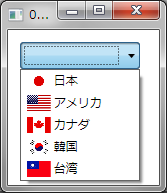
XAMLの例
<ComboBox>
    <ComboBoxItem>
        <StackPanel Orientation="Horizontal">
            <Image Source="./Images/japan.gif" Height="16" Margin="3"/>
            <TextBlock VerticalAlignment="Center">日本</TextBlock>
        </StackPanel>
    </ComboBoxItem>
    <ComboBoxItem>
        <StackPanel Orientation="Horizontal">
            <Image Source="./Images/usa.gif" Height="16" Margin="3"/>
            <TextBlock VerticalAlignment="Center">アメリカ</TextBlock>
        </StackPanel>
    </ComboBoxItem>
    <ComboBoxItem>
        <StackPanel Orientation="Horizontal">
            <Image Source="./Images/canada.gif" Height="16" Margin="3"/>
            <TextBlock VerticalAlignment="Center">カナダ</TextBlock>
        </StackPanel>
    </ComboBoxItem>
    <ComboBoxItem>
        <StackPanel Orientation="Horizontal">
            <Image Source="./Images/korea.gif" Height="16" Margin="3"/>
            <TextBlock VerticalAlignment="Center">韓国</TextBlock>
        </StackPanel>
    </ComboBoxItem>
    <ComboBoxItem>
        <StackPanel Orientation="Horizontal">
            <Image Source="./Images/taiwan.gif" Height="16" Margin="3"/>
            <TextBlock VerticalAlignment="Center">台湾</TextBlock>
        </StackPanel>
    </ComboBoxItem>
</ComboBox>
VBの例
Private Sub Window_Loaded(ByVal sender As System.Object, ByVal e As System.Windows.RoutedEventArgs) Handles MyBase.Loaded
    Dim stp As New StackPanel   'StackPanel
    Dim bi As New BitmapImage   'BitmapImage
    Dim jpnImage As New Image   'Image
    Dim tbName As New TextBlock 'TextBlock

    'StackPanelの設定(水平方向)
    stp.Orientation = Orientation.Horizontal

    'Imageの設定
    bi.BeginInit()
    bi.UriSource = New Uri("Images/Japan.gif", UriKind.Relative)
    bi.EndInit()
    jpnImage.Source = bi
    jpnImage.Height = 20
    jpnImage.Width = 32

    'TextBlockの設定
    tbName.Text = "日本"

    'StackPanelにImageとTextBlockを追加
    stp.Children.Add(jpnImage)
    stp.Children.Add(tbName)

    '作成したアイテムをComboBoxコントロールに追加
    ComboBox1.Items.Add(stp)
End Sub
C#の例
private void Window_Loaded(object sender, RoutedEventArgs e)
{
    StackPanel stp = new StackPanel();      // StackPanel
    BitmapImage bi = new BitmapImage();     // BitmapImage
    Image jpnImage = new Image();           // Image
    TextBlock tbName = new TextBlock();     // TextBlock

    // StackPanel の設定(水平方向)
    stp.Orientation = Orientation.Horizontal;

    // Image の設定
    bi.BeginInit();
    bi.UriSource = new Uri("./Images/japan.gif", UriKind.Relative);
    bi.EndInit();
    jpnImage.Source = bi;
    jpnImage.Height = 20;
    jpnImage.Width = 32;

    // TextBlock の設定
    tbName.Text = "日本";

    // StackPanelにImageとtextBlockを追加
    stp.Children.Add(jpnImage);
    stp.Children.Add(tbName);

    // 作成したアイテムをComboBoxコントロールに追加
    comboBox1.Items.Add(stp);
}