
ペンの太さや形状を変更するには、DefaultDrawingAttributes プロパティを使用します。
DefaultDrawingAttributes プロパティにはSystem.Windows.Ink.DrawingAttribute クラスのインスタンスを指定します。
太さは幅(Widthプロパティ)と高さ(Heightプロパティ)を指定することができ、幅の細いペンや太いペンを作成することができます。
また、ペンの形状は StylusTipプロパティ にEllipse(円)やRectangle(四角形)を設定することができます。
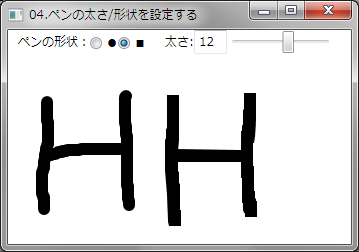
下記はペンの太さや形状を設定する例です。
ラジオボタンで線の形状「●」または「■」を選択することができ、スライダーコントロールで太さを変更することができます。
XAMLの例
<StackPanel>
    <StackPanel Orientation="Horizontal">
        <TextBlock Text="ペンの形状:" TextAlignment="Right" />
        <RadioButton Content="●" Name="RadioButton1" IsChecked="True" />
        <RadioButton Content="■" Name="RadioButton2" />
        <TextBlock Text="太さ:" />
        <TextBox Text="{Binding ElementName=Slider1, Path=Value, Mode=TwoWay}" />
        <Slider Name="Slider1" Width="107" Minimum="1"
                SmallChange="1" IsSnapToTickEnabled="True" Maximum="20" />
    </StackPanel>
    <InkCanvas Name="InkCanvas1" EditingMode="Ink">
        <InkCanvas.DefaultDrawingAttributes>
            <DrawingAttributes Width="1" Height="1" StylusTip="Rectangle"/>
        </InkCanvas.DefaultDrawingAttributes>
    </InkCanvas>
</StackPanel>
VBの例
'***** 追加 *****
Imports System.Windows.Ink

'描画属性用変数
Private inkDA As New DrawingAttributes

Private Sub Window_Loaded(ByVal sender As System.Object, ByVal e As System.Windows.RoutedEventArgs) Handles MyBase.Loaded
    '初期化
    inkDA.Width = 1     'ペンの幅
    inkDA.Height = 1    'ペンの高さ
    InkCanvas1.DefaultDrawingAttributes = inkDA
End Sub

' ペンの形状を●にした場合
Private Sub RadioButton1_Checked(ByVal sender As System.Object, ByVal e As System.Windows.RoutedEventArgs) Handles RadioButton1.Checked
    If IsNothing(InkCanvas1) Then Return

    '楕円形の先端に設定
    inkDA.StylusTip = StylusTip.Ellipse

    '属性をセット
    InkCanvas1.DefaultDrawingAttributes = inkDA
End Sub

' ペンの形状を■にした場合
Private Sub RadioButton2_Checked(ByVal sender As System.Object, ByVal e As System.Windows.RoutedEventArgs) Handles RadioButton2.Checked
    '楕円形の先端に設定
    inkDA.StylusTip = StylusTip.Rectangle

    '属性をセット
    InkCanvas1.DefaultDrawingAttributes = inkDA
End Sub

' ペンの太さ変更時の処理
Private Sub Slider1_ValueChanged(ByVal sender As System.Object, ByVal e As System.Windows.RoutedPropertyChangedEventArgs(Of System.Double)) Handles Slider1.ValueChanged
    If IsNothing(InkCanvas1) Then Return

    'ペン先の幅と高さを設定
    inkDA.Width = Slider1.Value
    inkDA.Height = Slider1.Value

    InkCanvas1.DefaultDrawingAttributes = inkDA
End Sub
C#の例
// 追加
using System.Windows.Ink;

// 描画属性用変数
private DrawingAttributes inkDA = new DrawingAttributes();

private void Window_Loaded(object sender, RoutedEventArgs e)
{
    // 初期化
    inkDA.Width = 1;    // ペンの幅
    inkDA.Height = 1;   // ペンの高さ
    inkCanvas1.DefaultDrawingAttributes = inkDA;
}

// ペンの形状を●にした場合
private void radioButton1_Checked(object sender, RoutedEventArgs e)
{
    if (inkCanvas1 == null)
        return;

    // 楕円形の先端に設定
    inkDA.StylusTip = StylusTip.Ellipse;

    // 属性をセット
    inkCanvas1.DefaultDrawingAttributes = inkDA;
}

// ペンの形状を■にした場合
private void radioButton2_Checked(object sender, RoutedEventArgs e)
{
    // 楕円形の先端に設定
    inkDA.StylusTip = StylusTip.Rectangle;

    // 属性をセット
    inkCanvas1.DefaultDrawingAttributes = inkDA;
}

//ペンの太さ変更時の処理
private void slider1_ValueChanged(object sender, RoutedPropertyChangedEventArgs e)
{
    if (inkCanvas1 == null)
        return;

    // ペン先の幅と高さを設定
    inkDA.Width = slider1.Value;
    inkDA.Height = slider1.Value;

    inkCanvas1.DefaultDrawingAttributes = inkDA;
}