
通常、値の進捗は左から右に向かって行われますが、FlowDirection プロパティにRightToLeftを指定すると、進捗を右から左に変更することができます。
FlowDirectionプロパティにはFlowDirection列挙体の値を指定します。
FlowDirection 列挙体 メンバ名 説明 LeftToRight 左から右に進捗させる RightToLeft 右から左に進捗させる
下記は、FlowDirectionプロパティを使用して、進捗方向を左から右に変更する例です。
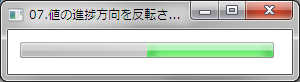
XAMLの例
<ProgressBar Name="ProgressBar1"
             VerticalAlignment="Top" HorizontalAlignment="Left"
             Margin="12,12,0,0" Height="16" Width="254"
             Minimum="0" Maximum="100" Value="50"
             FlowDirection="RightToLeft"/>
VBの例
Private Sub Window_Loaded(ByVal sender As System.Object, ByVal e As System.Windows.RoutedEventArgs) Handles MyBase.Loaded
    '進捗方向を反転させる
    ProgressBar1.FlowDirection = FlowDirection.RightToLeft
End Sub
C#の例
private void Window_Loaded(object sender, RoutedEventArgs e)
{
    // 進捗方向を反転させる
    progressBar1.FlowDirection = FlowDirection.RightToLeft;
}