
ツールバーを垂直に配置するにはToolBarTrayクラスのOrientationプロパティにVerticalを設定します。
OrientaitionプロパティにはOrientation列挙体の値を設定します。
メンバ名 説明 Horizontal ツールバートレイを水平に配置する(既定値) Vertical ツールバートレイを垂直に配置する
下記は、Orientationプロパティを設定してツールバーを垂直に配置する例です。
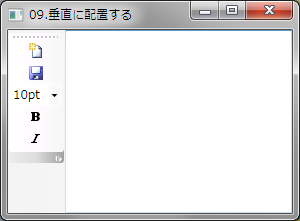
XAMLの例
<DockPanel Name="DocPanel1">
    <ToolBarTray Name="ToolBarTray1" DockPanel.Dock="Left" Orientation="Vertical">
        <ToolBar DockPanel.Dock="Top">
            <Button>
                <Image Source="Images/NewDocument.png" Width="16" Height="16" />
            </Button>
            <Button>
                <Image Source="Images/Save.png" Width="16" Height="16" />
            </Button>

            <ComboBox Width="50">
                <ComboBoxItem IsSelected="True">10pt</ComboBoxItem>
                <ComboBoxItem>11pt</ComboBoxItem>
                <ComboBoxItem>12pt</ComboBoxItem>
            </ComboBox>
            <Button>
                <Image Source="Images/boldhs.png" Width="16" Height="16" />
            </Button>
            <Button>
                <Image Source="Images/Italichs.png" Width="16" Height="16" />
            </Button>
        </ToolBar>
    </ToolBarTray>
    <TextBox></TextBox>
</DockPanel>
VBの例
'XAMLではなくコードで行う場合は下記のようにします

'ツールバーを垂直に配置する
ToolBarTray1.Orientation = Orientation.Vertical
C#の例
'XAMLではなくコードで行う場合は下記のようにします

'ツールバーを垂直に配置する
ToolBarTray1.Orientation = Orientation.Vertical