
本記事はWindowsアプリケーションのTipsです。
ボタンに表示されるテキストの位置を設定するには、TextAlignプロパティを使用します。TextAlignプロパティには表1のContentAlignment列挙体をセットします。
| メンバ名 | 説明 |
|---|---|
| BottomCenter | 下端中央 |
| BottomLeft | 下端左寄せ |
| BottomRight | 下端右寄せ |
| MiddleCenter | 中段中央 |
| MiddleLeft | 中段左寄せ |
| MiddleRight | 中段右寄せ |
| TopCenter | 上段中央 |
| TopLeft | 上段左寄せ |
| TopRight | 上段右寄せ |
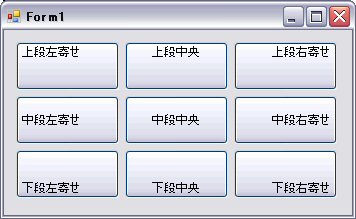
VBの例
Private Sub Form1_Load(ByVal sender As System.Object, ByVal e As System.EventArgs) Handles MyBase.Load
    Button1.TextAlign = ContentAlignment.TopLeft
    Button2.TextAlign = ContentAlignment.TopCenter
    Button3.TextAlign = ContentAlignment.TopRight
    Button4.TextAlign = ContentAlignment.MiddleLeft
    Button5.TextAlign = ContentAlignment.MiddleCenter
    Button6.TextAlign = ContentAlignment.MiddleRight
    Button7.TextAlign = ContentAlignment.BottomLeft
    Button8.TextAlign = ContentAlignment.BottomCenter
    Button9.TextAlign = ContentAlignment.BottomRight
End Sub
C#の例
private void Form1_Load(object sender, EventArgs e)
{
    Button1.TextAlign = ContentAlignment.TopLeft;
    Button2.TextAlign = ContentAlignment.TopCenter;
    Button3.TextAlign = ContentAlignment.TopRight;
    Button4.TextAlign = ContentAlignment.MiddleLeft;
    Button5.TextAlign = ContentAlignment.MiddleCenter;
    Button6.TextAlign = ContentAlignment.MiddleRight;
    Button7.TextAlign = ContentAlignment.BottomLeft;
    Button8.TextAlign = ContentAlignment.BottomCenter;
    Button9.TextAlign = ContentAlignment.BottomRight;
}
Please follow and like us:


コメント