
この記事では ComboBox で選択されているアイテムのインデックスを取得する方法について説明をします。
公式サイト情報はコチラを参照してください。
環境
| 開発環境 | Microsoft Visual Studio Enterprise 2019 Version 16.11.5 |
| Framework | Microsoft .NET Framewohttps://blog.hiros-dot.net/?p=11007rk Version 4.8.04161 |
選択されているアイテムのインデックスを取得する
ComboBox で選択されているアイテムmのインデックスを取得するには SelectedIndex プロパティを使用します。
以下は [選択アイテムのインデックスを取得] ボタンをクリックすると、ComboBox で選択されているインデックスを取得して TextBlock に表示する例です。
XAML の例
<Window
    x:Class="WinUISample.MainWindow"
    xmlns="http://schemas.microsoft.com/winfx/2006/xaml/presentation"
    xmlns:x="http://schemas.microsoft.com/winfx/2006/xaml"
    xmlns:local="using:WinUISample"
    xmlns:d="http://schemas.microsoft.com/expression/blend/2008"
    xmlns:mc="http://schemas.openxmlformats.org/markup-compatibility/2006"
    mc:Ignorable="d">

    <StackPanel Orientation="Vertical" HorizontalAlignment="Center">

        <ComboBox x:Name="myComboBox">
            <TextBlock Text="Apple" />
            <TextBlock Text="Banana" />
            <TextBlock Text="Grapes" />
            <TextBlock Text="Lemon" />
            <TextBlock Text="Orange" />
            <TextBlock Text="Pineapple" />
        </ComboBox>

        <Button x:Name="myButton"
                Content="選択アイテムのインデックスを取得"
                Click="myButton_Click"/>
        <TextBlock x:Name="myTextBlock" />

    </StackPanel>
</Window>
C# の例
以下は[選択アイテムのインデックスを取得]ボタンがクリックされた時のコード例です。SelectedIndex で選択されている項目のインデックスを取得して、TextBlock に表示しています。
private void myButton_Click(object sender, RoutedEventArgs e)
{
    int index = myComboBox.SelectedIndex;
    myTextBlock.Text = index.ToString();
}
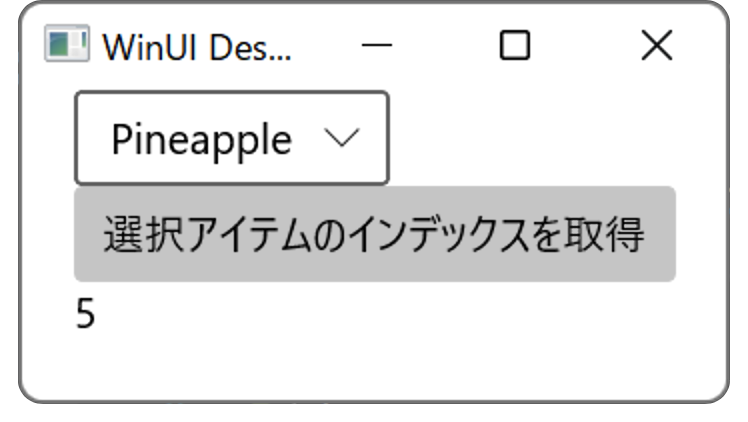
選択されているアイテムのインデックスを取得する例
WinUi Tips
本サイトでまとめている WinUI Tips の一覧はこちらから確認できます。
Please follow and like us:


コメント