
指定した行のテキストを取得するにはLinesプロパティを使用します。
Linesプロパティは、RichTextBoxのテキストを格納する文字列の配列です。
下記は指定した行のテキストを取得する例です。
[3行目のデータを表示]ボタンがクリックされると、3行目のテキストをメッセージボックスに表示します。
3行目は、VBではLines(2)、C#ではLines[2]で表すことができます(要素番号は0からはじまるので、n行目のデータの要素番号は”n-1″で表すことができます)。
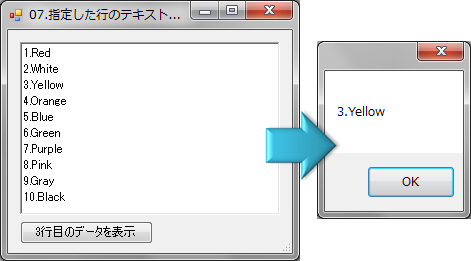
VBの例
' フォームロード時の処理
Private Sub Form7_Load(ByVal sender As System.Object, ByVal e As System.EventArgs) Handles MyBase.Load
    'RichTextBoxにデータを表示
    RichTextBox1.Text =
        "1.Red" & ControlChars.NewLine &
        "2.White" & ControlChars.NewLine &
        "3.Yellow" & ControlChars.NewLine &
        "4.Orange" & ControlChars.NewLine &
        "5.Blue" & ControlChars.NewLine &
        "6.Green" & ControlChars.NewLine &
        "7.Purple" & ControlChars.NewLine &
        "8.Pink" & ControlChars.NewLine &
        "9.Gray" & ControlChars.NewLine &
        "10.Black"
End Sub

' [3行目のデータを表示]ボタンクリック時の処理
Private Sub btnShowData_Click(ByVal sender As System.Object, ByVal e As System.EventArgs) Handles btnShowData.Click
    '★★★3行目のデータを取得★★★
    Dim strLine As String = RichTextBox1.Lines(2)

    MessageBox.Show(strLine)
End Sub
C#の例
// フォームロード時の処理
private void Form7_Load(object sender, EventArgs e)
{
    // RichTextBoxにデータを表示
    richTextBox1.Text =
        "1.Red\r\n" +
        "2.White\r\n" +
        "3.Yellow\r\n" +
        "4.Orange\r\n" +
        "5.Blue\r\n" +
        "6.Green\r\n" +
        "7.Purple\r\n" +
        "8.Pink\r\n" +
        "9.Gray\r\n" +
        "10.Black";
}

// [3行目のデータを表示]ボタンクリック時の処理
private void btnShowData_Click(object sender, EventArgs e)
{
    // ★★★3行目のデータを取得★★★
    string strLine = richTextBox1.Lines[2];

    MessageBox.Show(strLine);
}
Please follow and like us:


コメント
[…] 指定した行のテキストを取得する […]